Monday, February 1, 2016

[Tool sharing] Word Magnet from Triptico

Another week has passed by, and today we will be looking at one of the free tools from Triptico! I had some misunderstanding about how the free trial works for Triptico, so if you didn't see the [Edit] section in my previous post, the sad news is that the activities you create with the premium tools during your free trial period will be inaccessible after your free trial expires. :( Boo-hoo!

BUT... I'm going to introduce a FREE tool that you can use permanently! Hopefully after reading this post, you will be able to get a lot out of the free stuff Triptico has to offer!

WORD MAGNET is a very useful tool to enhance interaction between students and teachers, or students with their peers. The functions are easy to adjust, and there's wide range of various activities that can be applied to this tool.

BASIC FUNCTIONS

The main functions of this tool is to create words on magnets that can be dragged around as desired. The words can be made as single words, phrases, or even an entire paragraph. The magnets can be flipped back side by holding the right click of your mouse and swiping it vertically down on the magnet(s) (yes, you can flip more than one card at a time!). The magnets can be dragged around the page, and if you want to drag more than one magnet, just click the magnets you want, and a star will appear on the upper right corner.  It's okay if it's your first time using this tool or that you do not understand how it works. Triptico provides demo videos and ready made tools for you to familiarize with.

The vertical line indicates the magnets you will flip

Magnets can be flipped at the same time

The magnets are easy to move around and adjust! You can also see the basic functions for creating the magnets


ADVANCED FUNCTIONS 

What I love about Triptico's tools is that there are so many functions for you to personalise your tool to make this activity more relatable for the students and teachers and may even make the class more entertaining and lower students' anxiety!


1. Font
Triptico provides various types of fonts for you to choose from! If you are working with young learners, you can pick a whacky or creative font to grab their attention! I remember back in elementary school I used to like the curly fonts my teacher used!


2. Color and Size 
You may also adjust the color and size of the magnet and the background to match your needs. Bigger magnets are useful for large classrooms so students from the back can see, and it will be visually more comfortable, especially for elder learners! You may also color the magnets to categorize the magnets in different groups! It'll create a visual effect and help students internalize the words by associating them with one and another, or remembering the relationship between the words. 


3. Background 
The last function that you can use to customize your tool is to select a background. You can get creative with this, and use pictures OF your students or something you and your students have in common-- this will motivate them to participate in the class and may even excite them as well. 
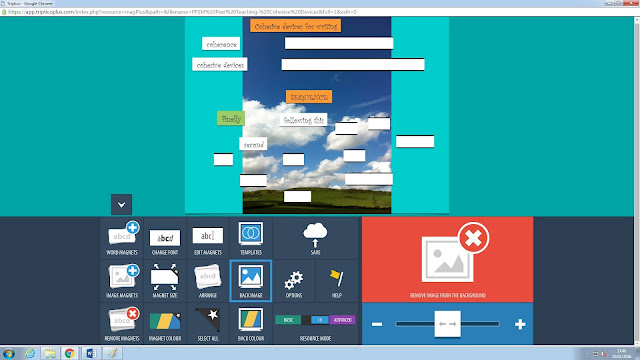
The crop only lets me keep the upper half of the picture. :(

The only "less user-friendly" of this function is that you can't crop the portion of the photo that you want. When you zoom in, Triptico automatically "selects" the cropped section for you. One possible solution is to crop the picture to the desired proportion before uploading it. 


HOW TO APPLY WORD MAGNET TO MY CLASSROOM?

Seeing the various possibilities to play around with Word Magnet, there is so much you can do to apply this tool effectively to your classroom!

With the dragging function, you can ask questions for learners to drag the correct magnet, or have a relay activity for teams to drag the magnets into the correct order (e.g. chronological order, from small to big...etc.).

The flipping function allows teachers to create a matching game as well. Children enjoy playing games, and matching is a good way to make learning fun!

Lastly, Word Magnet (and other tools on Triptico) can be edited whenever you want, so teachers can even invite students to join in the learning process and create their own magnets to add onto the content.

So there you have it, Triptico's free tool, Word Magnet! Just because you are unable to access the premium tools forever does not mean there aren't any useful tools left!

How would you incorporate this tool into your classroom? Are there any other thoughts about how this tool would enhance your teaching? Leave a comment below! :)


Sunday, January 24, 2016

[Tool Introduction] Triptico

Today I will share with you a wonderful website, Triptico, that provides very interactive, innovative, and fun educational tools teachers can use to engage their students and to stimulate their interest in learning!


Triptico has a great variety of tools you can choose from. It's easy to create activities with these tools that can fit into your classroom and make your lesson more lively! From grouping students to randomly selecting a student to perform on stage to playing bingo...Triptico's functions cover different aspects of the classroom, which I find to be very helpful, and may also change students' perception of English class (as my tutor, Tilly, mentioned, the general sense of the English class is "boring"...hope this tool can overturn this kind of mindset!). 


There is so much you can do with Triptico. The tools can be used to teach any kind of focus in English learning, such as vocabulary, grammar or even communicative skills. You can also decorate the tools with your own pictures, so you can find pictures that are visually appealing or even personally relevant to the students' life.  The special effects (sound and motion) are also what makes the activities lively, and will surely bring excitement to the class! 

Using your own photos makes the activity more personalised and meaningful to the students! For instance, you can use a picture of the school dog that students are familiar with!


The activities highly require student interaction, which may even increase the shy ones' motivation to participate actively! The tools are really adaptable, you can use it to supplement the content of your lesson.  I believe it would trigger the interest of students ranging from young learners to adults! 


The downside to Triptico is that it is not completely free. :( You may use the one month free trial to try out all of their premium tools, though!  Tilly told us that we can create as many tools as we want during the free demo period and save them permanently! Right now, I'm trying to make the best of it! After the free trial is over, you can still create new activities with the free tools. 

Some activities I have created with the tools! During free trial you can save both free and premium tools. 

In my next blog, I will introduce the tool, Word Magnet! So stay tuned for that! :)
--------------------------------------------------------------------------------------------------------------------------

[EDIT]


Today as I was discussing about Triptico with my classmate, she told me that she tried to use the premium tools she had saved after the 30 day trial, and apparently she was unable to use it. :( I may have mistaken my tutor's words. Ack! Sorry about the confusion! Either way, the tools are still fun to play around with, and may inspire you with more interactive tasks! 


Tuesday, January 19, 2016

[Blog Review] Özge Karaoglu's Blog

Good day, folks!

Today I will share some points I have observed about 
Özge Karaoglu's educational blog.   Özge shares various types of online tools for teachers to utilise in their classroom. This review is divided into four categories: organisation and layout, content and features, ease of use and navigation, and target audience. 


Organisation and Layout:

The logo was the first thing that caught my attention and left a deep impression my mind. It is very vibrant and creative; the idea of having different hands holding out drawn signs with phrases/roles that describe the blogger and pictures that symbolise the purpose/functions of the blog catches the readers’ attention and gives the readers an overall idea about the content of this blog.

The blog is organised in a visually comfortable format. The web entries and side bars are not cluttered together, the background is clean, and font is clear and simple. Not too much is going on on the page, but the key phrases are highlighted, such as bold faced or underlined, to capture the reader’s attention of the main idea, and the pictures enhance the visual impression that readers have on the blog posts. 

Content and Features 

This blog mainly posts about different web tools that teachers can use in their classrooms. 
The blogger gives a brief description about the tool, and then provides suggestions of how teacher can incorporate these tools into their lesson, which is quite helpful for beginners that do not have much idea or experience of how to incorporate the tools into the classroom. 


Ease of use and Navigation 

The blog posts are in reverse chronological order without other sources of navigation (such as categories, tags, or calendar), so if a reader wants to find a specific post, he/she can only find it by scroll through the entire entries or search it up in the search bar. If the blogger had categorised the posts in different subheadings on a sidebar or top bar, it would be more convenient for readers to navigate and quicker for them to find what they want/need. 
The blog is very simple and straightforward. There is not that much diversity in it in terms of different functions or types of entries, so it’s pretty easy to see what there is to do on each page.


Target Audience

This blog is mainly for teachers that are interested in incorporating online tools into their teaching. The blog is open to the public, so anyone can make a comment. The posts are very brief introductions to the tools the blogger describes, so this blog might fit the needs of inexperienced teachers or teachers that are new to infusing technology into their teaching.


That's about it! Overall, this is a resourceful tool for teachers that are looking for suitable or appropriate tools for their lesson!

Cheers,
Wanda